ChatGPT Ads Adds Target CPA & Target CPC
Saying that OpenAI moved fast to build out ChatGPT ads is an understatement. CPM-only test in early February, self-serve CPC...
Continue Reading
ChatGPT Business Hub is here. Is it really the “Search Console for ChatGPT”? Not quite.

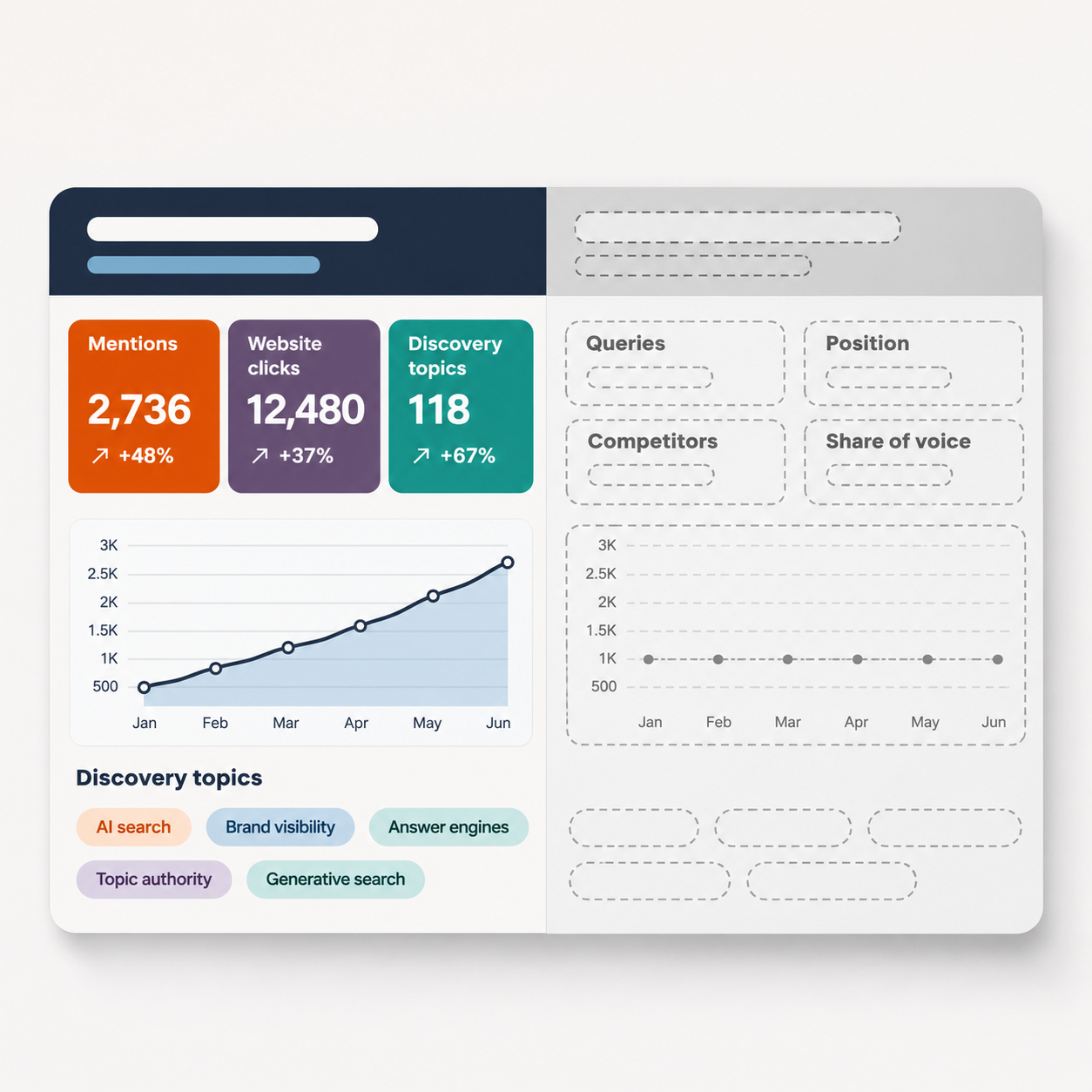
Business Hub gives verified businesses first-party data from inside ChatGPT: website mentions, click-throughs, and discovery topics.
Unlike Google Search Console, it doesn’t show queries, positions, page-level data, or competitors.
Mentions only count when ChatGPT references a website – third-party mentions go unrecorded.
Claiming a business doesn’t guarantee better ChatGPT visibility.
Business Hub provides a baseline for measuring ChatGPT visibility; it does not replace AI visibility trackers.
Executive Summary: On November 10, 2026, OpenAI launched ChatGPT Business Hub (beta), giving verified businesses first-party data on mentions, website clicks, and discovery topics. At best, it’s a partial Search Console: no queries, positions, or competitors, and mentions coming from third-party sources go uncounted. Best used as a benchmark for calibrating your AI visibility tools, definitely not a replacement.
After two years of inferring AI visibility from sampled prompts and piecing together referral traffic in analytics, anyone working on ChatGPT SEO finally has what they’ve been waiting for:
The Business Hub.
Able to give brands their first direct look into how they perform inside OpenAI’s engine, many were quick to call it “Search Console for ChatGPT.”
Is it, though?
On November 10, 2026, ChatGPT Business Hub went into live beta, enabling verified businesses to update their details, connect product feeds with prices and availability, and, most importantly, view engagement insights including:
Business Hub adds the long-awaited management layer to Businesses in ChatGPT, finally giving brands a first-party glimpse into how their brand performs inside the platform.
What ChatGPT Business Hub does and doesn’t show
Business Hub insights cover activity inside ChatGPT only.
What it shows
What it doesn’t show
Insights are aggregated over the past 28 days and shown only once activity clears OpenAI’s privacy thresholds. A blank metric doesn’t necessarily mean zero activity.
Source: OpenAI Help Center, “Setting up your business on ChatGPT” (verified November 2026). Analysis: ZeroClick Labs.
In addition to Business Hub, eligible U.S. ecommerce and online service businesses can build and publish a Business Agent – a labeled side conversation (akin to on-site support chatbots, but embedded in ChatGPT) that answers customer questions using information and guidelines you provide.
Notably, businesses can pay to advertise their Business Agent in ChatGPT. People who click the ad land straight into a chat with a Business Agent instead of on the brand’s website, effectively making an agent the ad’s landing page.
In OpenAI’s own words, “Any eligible business located where ChatGPT is available can claim their business in ChatGPT through Business Hub.” However, “any” should be taken with a dose of reserve, because eligibility also depends on industry, location, and OpenAI’s own verification and integrity checks.
For now, three groups are effectively locked out from (or poorly supported by) ChatGPT Business Hub:
Unlocking the full (beta) functionality of ChatGPT Business Hub is a two-step process. The first step is claiming your business, and it’s relatively straightforward: you verify it via business phone/email, a DNS record, or Shopify, and OpenAI reviews the claim.
The second step is identity verification via Persona – a third-party ID check platform that may ask for government ID and business registration details to confirm that you, the person, are who you say you are and are authorized to represent the business.
Only once you pass a Persona check can you view insights, edit your listing (change business details, connect a product feed), create a Business Agent, and earn the verified badge (a blue check on your ChatGPT profile).
Note that, at the time of writing, OpenAI lists no fee to claim or use Business Hub, and you don’t need an Ads account or a ChatGPT Enterprise agreement to claim an eligible business. The paid part is advertising, including sponsoring a Business Agent.
Comparing ChatGPT Business Hub to Google Search Console (GSC) is only natural, since they do share some functionalities: both provide first-party data, both are free for verified owners, and both pair exposure with clicks.
However, unlike GSC, Business Hub reports no queries, page-level data, ranking position, or click-through rate (CTR) by query. It only confirms that you appeared and under which broad themes, but not what you appeared for.
ChatGPT Business Hub vs. Google Search Console
Both give you first-party data. Only one tells you what you appeared for.
Sources: OpenAI Help Center; Search Console Help, Performance report; Google Search Central Blog (all verified November 2026). Analysis: ZeroClick Labs.
ChatGPT Business Hub measures brand mentions, website clicks, and discovery topics (themes), aggregated over the past 28 days and displayed only once activity clears OpenAI’s privacy thresholds.
| Table 1: What ChatGPT Business Hub insights measure | ||
| Metric | What it counts | What it misses |
| Mentions | ChatGPT references your website (online businesses) or shows a result for your location (local businesses) | Your brand named without a reference to your site |
| Website clicks | Recorded clicks on links to your site | Whether a visit or conversion followed |
| Discovery topics | Common themes in answers that mentioned or cited you | The individual prompts, and the intent behind them |
| Source: OpenAI Help Center, “Setting up your business on ChatGPT” (verified November 2026) | ||
Two important notes here. First, a blank metric doesn’t necessarily mean zero – it can mean that activity hasn’t crossed OpenAI’s threshold yet.
Second, there are no prompts, position, competitor benchmark, share of voice (SoV), or engines other than ChatGPT. In other words, every input you need to gauge exactly why the needle moved is absent.
OpenAI was clear about this: claiming your business does NOT guarantee better visibility, advertising does NOT influence ChatGPT’s answers, the engine may draw on other sources, and OpenAI can edit or replace what you submit.
ChatGPT visibility still depends on factors that get you cited, and your accurate business details and product feeds are just entity clarity and reliability signals – they help the engine describe you faithfully, not recommend you more often.
The biggest benefit of Business Hub is that you finally have a benchmark for trend lines. Third-party AI visibility trackers only estimate your presence, and those estimates oscillate from run to run. Hub’s numbers come from actual ChatGPT usage, giving you a baseline to calibrate your tracker against.
That said, Business Hub has two major limitations that require planning around:
For now, the best move is to claim your listing, complete Persona verification, and start logging ChatGPT referral traffic in your own analytics so you have a baseline to check the Hub’s numbers against.
Tina Clarke is the AI SEO Manager at ZeroClick Labs, specializing in AI search optimization and Generative Engine Optimization (GEO). With a strong foundation in content strategy, technical SEO, and operations, she leverages her expertise to help brands shift from traditional rankings to discoverability and excel in AI-driven ecosystems.
Changing it? That’s a different job.
Our job.
At ZeroClick Labs, we specialize in interpreting first-party signals like these, and turning them into a citation strategy that holds up across ChatGPT and every other engine your buyers use.
Business Hub, Google Search Console, Bing Webmaster Tools – they show you where you stand.
“Our agency had no idea how to approach AI visibility. ZeroClick only does this one thing so they actually know what works. Worth every penny just to not waste time figuring it out ourselves.” – Jay